MCP · Series · 03 of 5
RBAC in MCP: Different Tools for Different Users
At the end of the last post, the server worked — but it acted as exactly one fixed person. Two people connecting would both look like the same student. This post fixes that. Each person connects as themselves, and the set of tools they’re offered changes with who they are. This is called RBAC — Role-Based Access Control, the idea that what you’re allowed to do depends on your role (student, teacher, manager). Let’s start by watching it work.
The demo: one server, two people, two different toolboxes
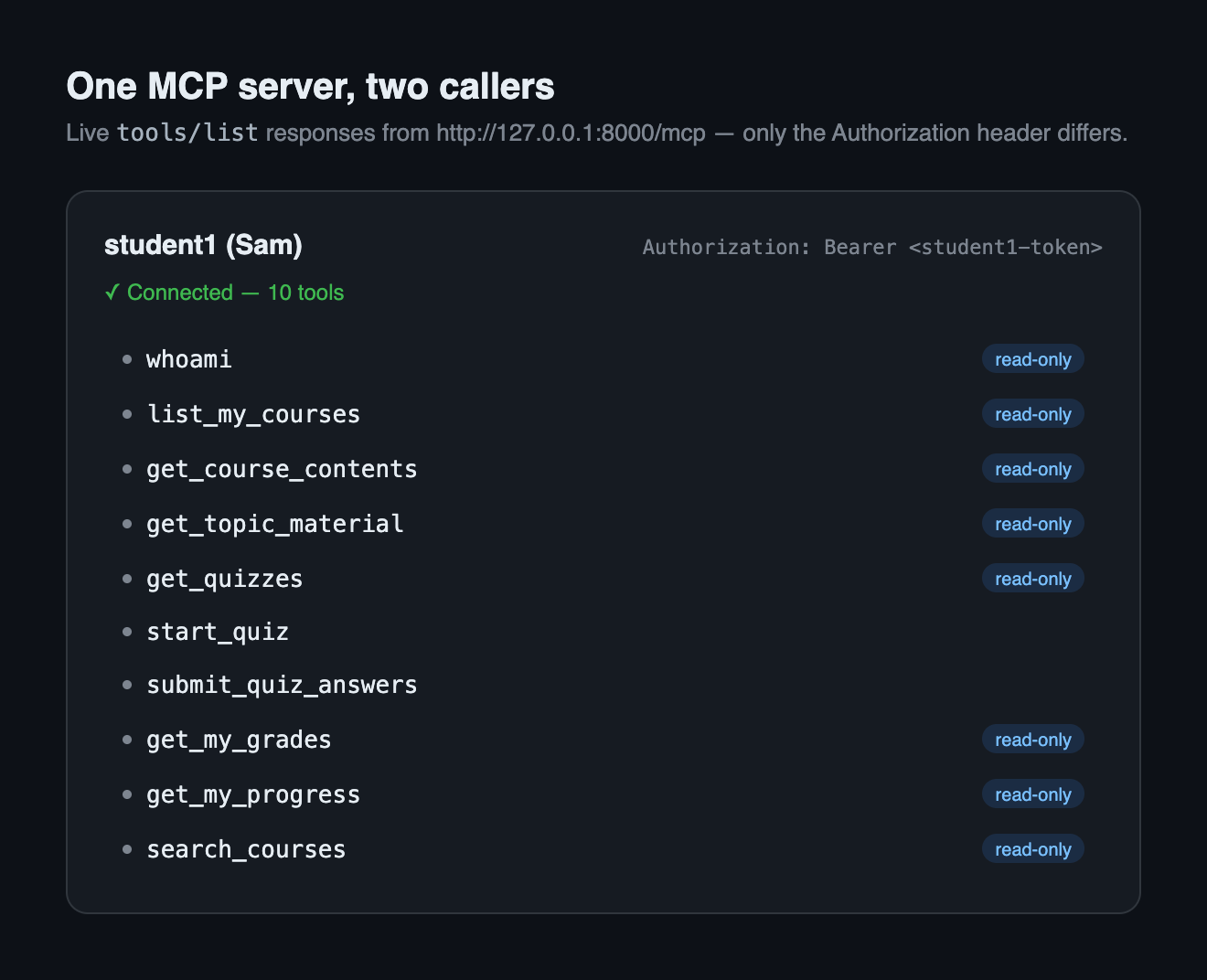
Here is the whole point of the post in two pictures. Same running server, two people connecting. First, the student’s view — the list of tools their AI client is offered:
Now the teacher connects to the same server, on the same address, and asks for their tools:
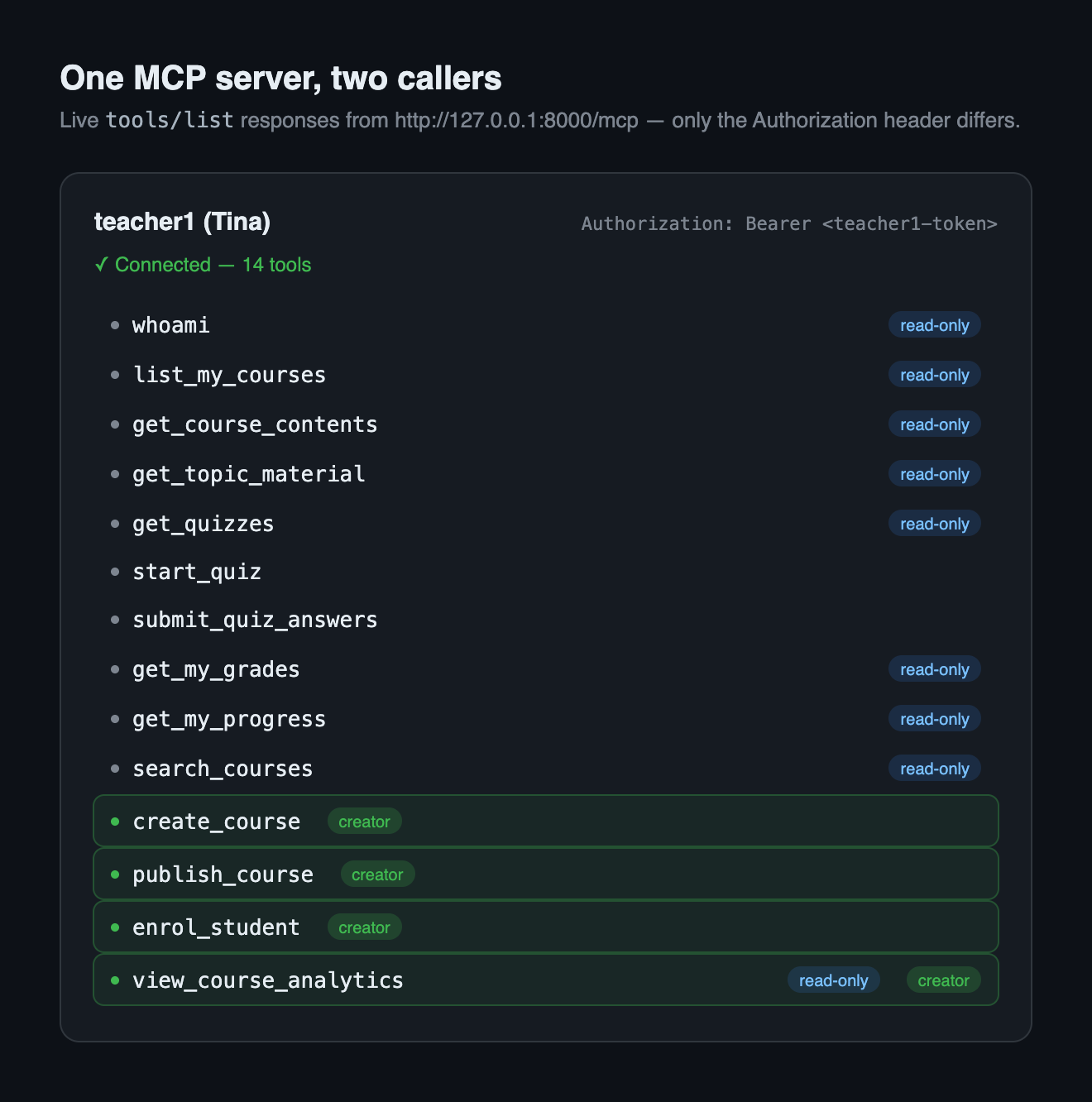
The student sees ten tools. The teacher sees fourteen — the same ten, plus four for managing courses. Here is the subtle part, and it’s the whole design: the student does not see a greyed-out create_course button they’re not allowed to press. The tool simply does not exist in their world. Their AI never learns it’s there, so it can never suggest it, mention it, or try it. To the student’s client, a server that can create courses and one that can’t are indistinguishable.
That is a real, per-person difference produced by a single server. To understand how it’s possible, we first have to change one thing about how the server is even reached.
Why this needs a new transport
Recall the last post’s connection: on your own machine, the host launches the server as a small program and talks to it through that program’s input and output — the stdio transport. That has a hidden consequence for identity. One launched program serves one person. Whoever started it is the user, fixed for the program’s whole life. There is no “who is asking?” — there’s only ever one asker.
So RBAC isn’t just hard over stdio; it’s meaningless. To hand different tools to different people, the server has to first know which person is on the line for each request. That’s a switch to the other transport MCP defines: Streamable HTTP. Instead of a launched program, the server is a long-running web service at an address (here, 127.0.0.1:8000/mcp). Many people can connect to the one server at once, over the network.
And crucially, each request they send carries a small proof of who they are. That proof is a bearer token — a secret string in the request’s header that means “whoever bears this token is this user.” It rides in a header line that reads Authorization: Bearer <token>. The exact same request, with a different token, is a different person. Identity stops being fixed at launch and becomes part of every message.
For our lab, the token is simply a user’s Moodle web-service token — the access key from the last post that lets the server call Moodle as that user. One token per person, minted by the admin. The server keeps one Moodle connection per distinct token, and figures out identity per request. That whole contract lives in one small file: . Its core is the resolve function — “who is this request?”:
def resolve(ctx: Context) -> MoodleClient:
    """The Moodle identity for THIS request.

    HTTP + bearer  -> that user's client (created on first use)
    stdio          -> the default client from the lifespan
    HTTP, no token -> AuthError telling the caller what to send
    """
    pool = ctx.request_context.lifespan_context.pool
    token = bearer_token(ctx)
    if token:
        return pool.for_token(token)
...The three-layer security model
Before the build, the mental model — because it explains why the code is shaped the way it is. Hiding a tool from the student’s list is nice, but it is not security. A list is just a suggestion; nothing stops a hand-written client from calling create_course anyway, blind, without ever asking for the list. So real access control here is three layers, each doing a different job:
- Visibility. The tool list is filtered to match the caller. The student’s list has no
create_course. This is for the honest majority — it keeps the AI from ever considering a tool it shouldn’t. Good UX, not a wall. - Guard. Every management tool re-checks the caller’s rights in its own body and refuses politely if they don’t have them. This catches the sneaky client that called the hidden tool directly.
- Enforcement. Even if layers 1 and 2 both had a bug, Moodle itself rejects an unauthorized action. A student’s token physically cannot create a course, no matter what our server does. This is the backstop that makes bugs in the first two layers embarrassing instead of catastrophic.
Layers on purpose. The whole intent is written into the top of the file that owns layer one: . Keep this three-layer picture in mind; the rest of the post is really just building each layer and tripping over Moodle on the way.
How I built it — and everything that went wrong
The build happened in one long day, and almost every step hit a wall in Moodle’s permission system. I’ll take them in the order they actually happened, because the order is the lesson: each wall only showed up once the previous fix let me get far enough to hit it.
First wall: “what can this person do?” — and my own wrong answer
Layer one needs to sort callers into “can manage courses” or “can’t.” My first instinct, written down in the Phase 2 notes from the last post, was to read the list of functions each token is allowed to call — surely a teacher’s token can call more things than a student’s. That was wrong, and it’s worth admitting rather than quietly fixing. That function list is attached to the service, not the person: every token pointed at the same service sees the identical list. Useless for telling a teacher from a student.
The right signal turned out to be a Moodle function that answers a capability question directly: core_course_get_user_administration_options returns, per course, plain true/false flags for what this user may do — including an update flag that is true for a teacher of that course and false for a student. So the real rule became: you’re a course manager if you’re a site admin or Moodle grants you update on at least one course. That check lives in the Moodle wrapper — , method can_manage_courses:
courses = await self.my_courses()
result = await self.call(
    "core_course_get_user_administration_options",
    courseids=[c["id"] for c in courses],
)
self._can_manage = any(
    o["name"] == "update" and o["available"]
    for c in result["courses"]
    for o in c["options"]
)
With that one honest question answered, layer one is almost trivial. FastMCP builds the tool list from a single handler; we swap in our own that asks can_manage_courses first, and drops the four creator tools for anyone who comes back false. The whole gate is about fifty lines in :
async def gated_list_tools() -> list[MCPTool]:
    """FastMCP's own conversion, minus creator tools for non-creators."""
    tools = await mcp.list_tools()
    if await _caller_is_creator():
        return tools
    return [t for t in tools if t.name not in CREATOR_TOOLS]
Layer one, done: that’s the difference between the two screenshots at the top. Now I tried to give the teacher a tool that actually creates a course — and the walls started falling in a row.
Second wall: the teacher creates a course they can’t open
The create_course tool calls Moodle’s create-course function, gets back a course id — success. Except the new course was invisible to its own creator. In Moodle’s web interface, making a course also makes you its teacher. The programming interface does not do that. So the teacher had just created a hidden course they couldn’t enter, edit, or enrol anyone into.
The fix is to do by hand what the web UI does for free: right after creating the course, assign the creator as its editing teacher. You can see it inside the tool — :
# The web UI assigns the creator as teacher on new courses; the WS
# function does NOT (you'd create a course you cannot even open).
me = await client.my_userid()
await client.call(
    "core_role_assign_roles",
    assignments=[{
        "roleid": EDITING_TEACHER_ROLE_ID,
        "userid": me,
        "contextlevel": "course",
        "instanceid": course["id"],
    }],
)
Third wall: you can’t assign yourself to a course you can’t enter
That self-assign immediately failed too. To be given a role inside a course, Moodle first makes you “enter” the course — a check called require_login. And the course-creator role, by default, lacks the two capabilities needed to enter a brand-new, still-hidden course: moodle/course:view and moodle/course:viewhiddencourses. So the creator couldn’t step into the very course they’d just made.
This one isn’t a code fix — it’s a policy decision about the site, so it belongs in the setup script, not the server. I granted the course-creator role both capabilities, deliberately and documented, in the Phase 4 seed: .
Fourth wall: the second, invisible gate on assigning roles
Still failing. It turns out “assign a role” in Moodle is guarded by two separate gates, and everyone forgets the second one. The first is the obvious capability — are you allowed to assign roles at all? The second is a separate table, the allow-assign matrix, that says which roles you may hand out. Having the power to assign roles doesn’t mean you can assign that role. A course creator had the capability but wasn’t on the list of people allowed to appoint editing teachers.
Three walls, one goal: a teacher who can create a course and become its teacher. All three fixes are plumbing — role grants and a matrix entry — captured as repeatable admin steps in the same seed script, so anyone cloning the repo gets the same working setup with one command.
Fifth wall: teachers can’t search for users, so enrolment changes shape
Next tool: enrol a student into the course. The natural design is “enrol by username.” Two more Moodle realities killed it. First, a teacher searching all users by field gets back an empty list — no error, no warning, just []. Teachers simply cannot search the whole site for people. Second, in the participant lists a teacher can see, Moodle shows each person’s email and full name but never their username. So a username is both un-searchable and un-seeable for the exact person doing the enrolling.
Rather than fight this, the tool design follows it. enrol_student takes an email — the one identifier a teacher can actually see — and looks the user up in two tiers: try a site-wide search first (which works only if the caller is an admin), and otherwise scan the participants of the caller’s own courses. Permission reality drove the tool’s signature. You can read the two-tier lookup in . The guard layer lives here too — every creator tool opens with the same check, so a hidden tool called blind still refuses:
async def _creator_client(ctx: Context) -> MoodleClient | None:
    """The caller's client if they may manage courses, else None."""
    client = _moodle(ctx)
    return client if await client.can_manage_courses() else None

# ...and at the top of every creator tool:
client = await _creator_client(ctx)
if client is None:
    return _NOT_CREATOR   # polite refusal — that's layer two
Sixth wall: enrolment crashes because there’s no mail server
Enrolment finally reached Moodle — and threw Message was not sent. from inside the call. The cause is a classic self-hosted trap: enrolling someone makes Moodle try to email them a notification, our lab has no mail server, the email attempt fails, and that failure bubbles up and breaks the whole enrolment. The action itself was fine; the courtesy email killed it.
Two smaller lessons: reruns and a moving SDK
Two last snags, smaller but worth naming. First, the tests create real courses, so running them twice left junk behind that broke the next run. The fix is the same discipline as the last post: tests clean up after themselves by course short-code, before and after, so every run starts from a known state. Second, mid-phase the MCP library renamed its HTTP client: the old streamablehttp_client was deprecated in favour of streamable_http_client, which takes a fully-prepared web client instead of a headers argument. A reminder that the SDKs around a young standard still move under you — pin versions, and read the changelog.
All three layers, running
With every wall behind us, the whole thing works end to end. Here’s a teacher session doing the full loop — create a course, enrol a student by email, publish it, then read the analytics — none of which the student’s client could even attempt:
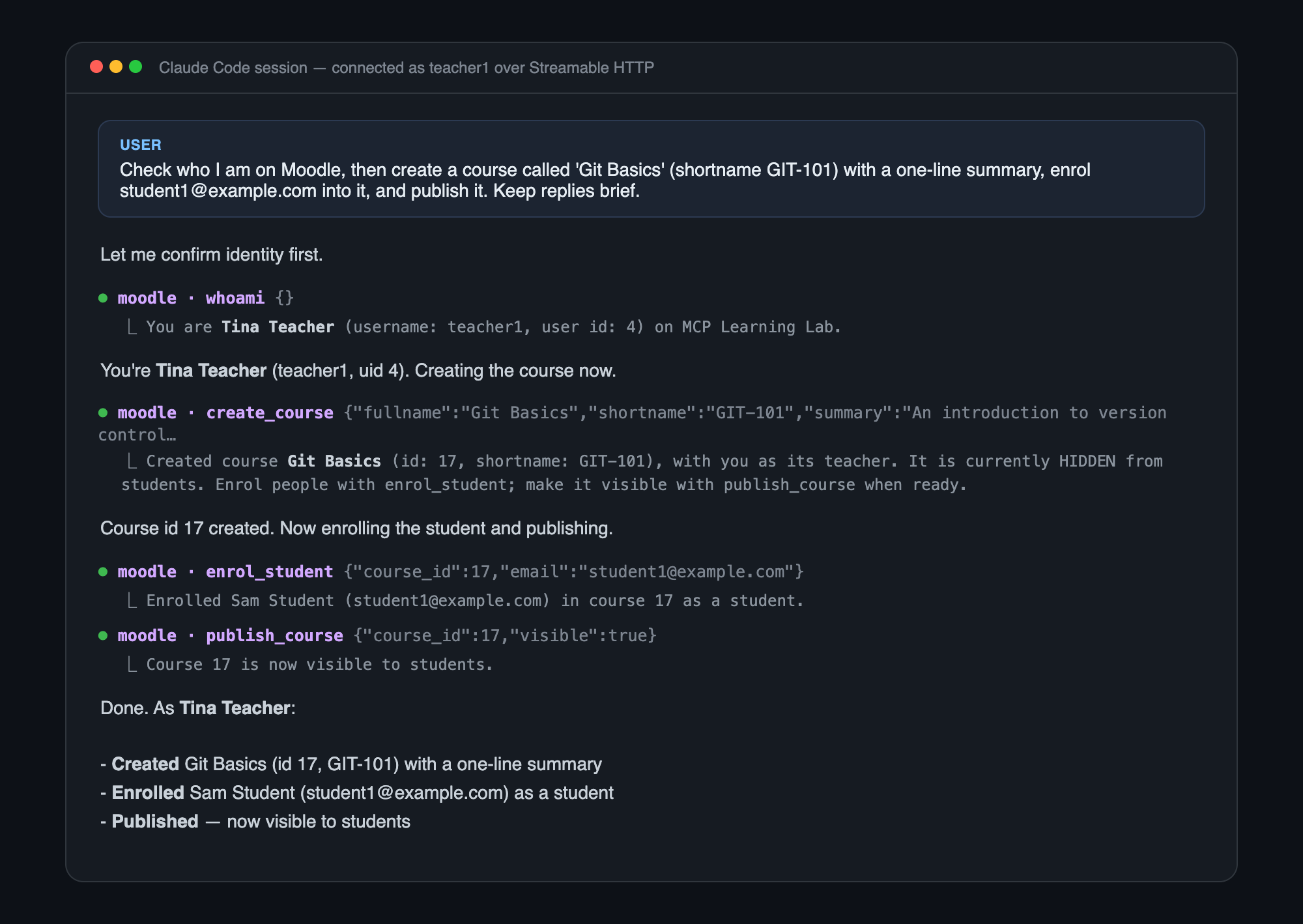
And the whole demo is really the test file — every assertion in it is a line of the story: the two tool lists differ, the creator tools are absent for the student, a hidden tool called blind refuses, and the full teacher workflow runs. It’s all in — the demo, written as checks that either pass or don’t.
The recap, interview-style
This phase is a small mountain of interview answers. If someone asks about any of these, you’ve now built the real thing:
- “What changes between stdio and HTTP besides the socket?” The identity model. stdio fixes identity at launch — one user per process. HTTP makes identity per-request, carried in the bearer header. RBAC needs the second.
- “Where should authorization live — the tool list, the tool body, or the backend?” All three, doing different jobs: visibility for UX, a guard for the sneaky caller, backend enforcement as the backstop. Any one alone is a bug waiting to happen.
- “Why is deriving permissions from role names an anti-pattern?” Names are labels, not capabilities — and in a real system they’re contextual. Ask what the identity can actually do (a capability check), not what it’s called.
- “How would you do multi-tenant auth in MCP before full OAuth?” Map a per-request bearer token to a backend identity, keep one backend client per token, and let the backend enforce. Isolate it in one file so swapping in real OAuth later touches nothing else.
Your turn: three questions
These check the three ideas that carry the whole post — the transport, the layers, and the signal.
RBAC in MCP — quick check
0/3 answered// question
Why can’t you do per-user RBAC over the stdio transport?
// question
A hand-written client ignores the tool list and calls the hidden create_course directly. Which layer stops it — and which is the final backstop?
// question
What’s the right signal for “can this person create courses?”
What’s next
The server now knows who’s calling — but only because we handed each person a raw Moodle token and trusted it. That’s fine for a lab and wrong for the real world: there’s no login, no consent, no expiry, no way to limit what a token can do. The next post is the flagship. We wire in a real identity provider and implement the actual MCP authentication spec — OAuth 2.1, a genuine login flow, scoped tokens, and the reason the spec forbids simply passing a token through. The one file we isolated today, , is where all of it will land.