MCP · Series · 04 of 5
MCP Auth, Done Right
This is the centerpiece of the series. Everything so far has been about what an MCP server can do. This post is about who is allowed to ask — done properly, the way the MCP specification actually says to do it, with a real login server, real consent, and real expiring tokens. It’s also the part interviewers probe hardest, because most people’s understanding stops at “just send a token.”
Act 1 and Act 2, side by side
In the last post, connecting a client looked like this. You asked an admin for a Moodle token — a long secret string — and pasted it into your config by hand:
# Act 1 (last post): you paste a secret someone handed you
claude mcp add --transport http moodle http://127.0.0.1:8000/mcp \
  --header "Authorization: Bearer <a-real-Moodle-token>"
It worked. But look at everything wrong with it. That token never expires. Nobody ever asked you whether this app could act as you — there is no consent step at all. It can do everything your account can do; there’s no way to say “read-only, please.” And it behaves exactly like a password: if it leaks, whoever holds it is you, forever. Every new client needs one delivered through some side channel — a chat message, an email, a sticky note.
Here is the same connection after this post. Look closely at the command:
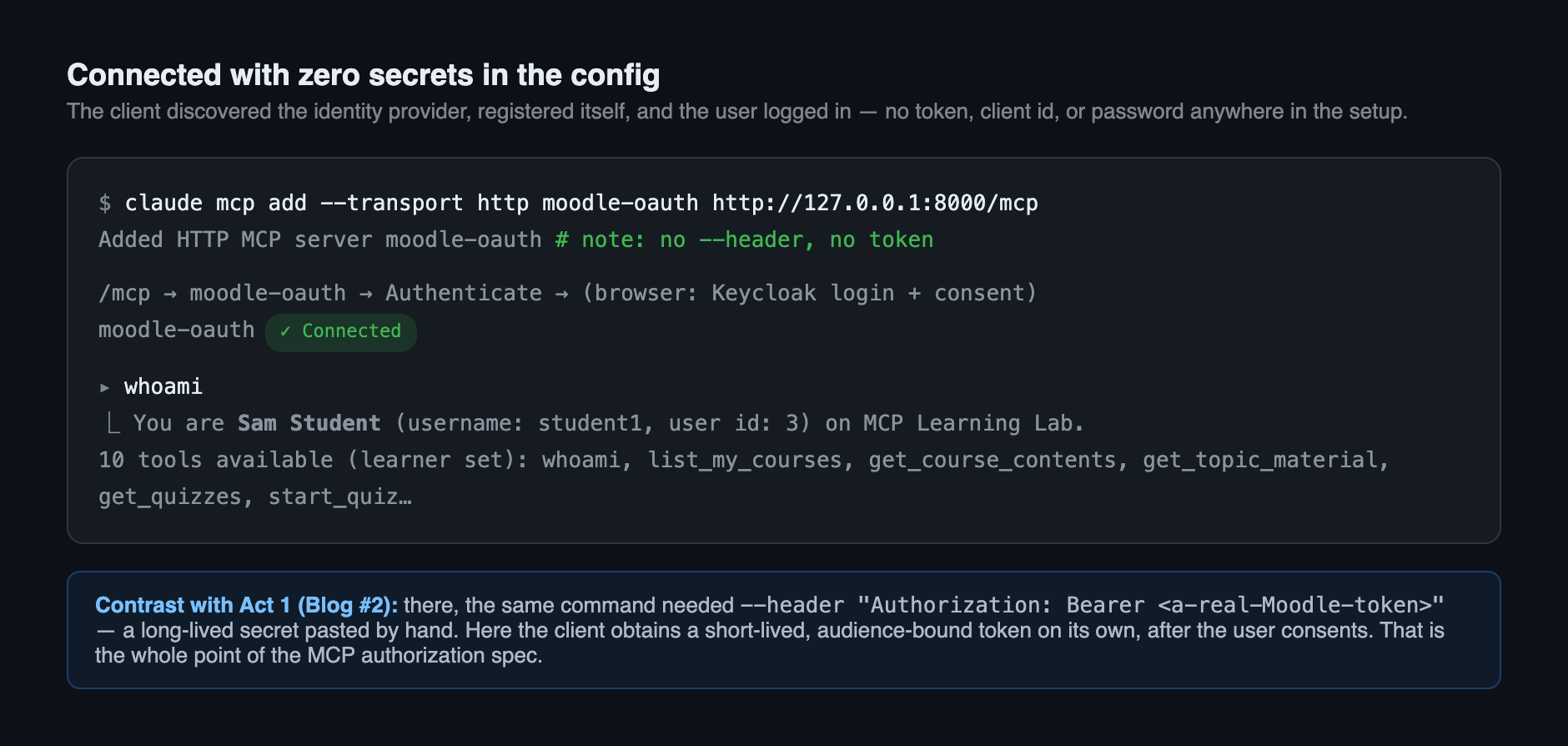
No token. No client id. No password in any config file. You run the command, a browser opens, you log in, you click Yes, and you’re connected — as yourself, with a token that expires in an hour and works on this one server only.
And here’s the part worth pausing on: the tools didn’t change. Same ten learner tools, same role-gating, same Moodle underneath. Two files changed — and a new . The last post’s code even predicted this in a comment: keep identity logic in one file, and swapping in real authentication touches nothing else. That prediction is now a receipt in the git history.
The words you need first
This topic drowns beginners in vocabulary, so let’s define the terms once, in plain language, before any of them appear in code.
- OAuth 2.1 — the standard way for an app to get permission to act on your behalf, without ever seeing your password. It’s what sits behind every “Sign in with Google” button.
- Identity provider (or IdP) — the service that holds the accounts and does the actual logging in. Google is one. Ours is Keycloak, a free, self-hosted IdP running in Docker next to Moodle.
- Realm — Keycloak’s word for one isolated world of users, settings, and apps. Ours is called
mcp-lms. - JWT (say “jot”) — JSON Web Token. A token that isn’t a random string but a small bundle of facts, cryptographically signed. Anyone can read what’s inside; nobody can change it without breaking the signature.
- Claim — one fact inside a JWT. Who the user is, when the token expires, who the token is for.
- Scope — a named slice of permission the token carries, like
lms:read. Scopes are how “read-only, please” becomes real. - Audience — the claim naming which server this token may open. This one turns out to be the hero of the whole post.
Two more arrive when we need them: PKCE and Dynamic Client Registration. Ignore them for now.
The whole flow, in one picture
Here is what happens between a brand-new client and our server, from knowing nothing to making its first authenticated call. Several parties are involved, but the sequence is a straight line:
Steps 1 to 3 are discovery: a client that started with nothing but a URL works out where to go and log in. Step 4 is registration. Step 5 is the human part. Steps 6 to 8 are the payoff. Now let’s watch each one happen for real.
The spec, as an executable test
I want to make a claim and then back it with something you can run. The claim: any spec-compliant MCP client can connect to our server with zero manual setup. The proof is a single test — , the function test_full_flow_from_zero. It plays a client born knowing only the server’s URL, and walks the entire flow: 401, discovery, sign-up, a real login form, a real consent screen, a token, and a working MCP session.
That test is the specification, made executable. So let’s read it top to bottom — each block below is one step of the diagram above.
Step 1 — Knock with nothing, get a signpost
# 1. knock on the door with no credentials
r = httpx.post(MCP_URL, json={"jsonrpc": "2.0", "id": 1, "method": "initialize", "params": {}},
               headers={"accept": "application/json, text/event-stream"})
assert r.status_code == 401
prm_url = re.search(r'resource_metadata="([^"]+)"', r.headers["www-authenticate"]).group(1)
The client calls the server with no token and gets 401 Unauthorized. Nothing surprising there. The important part is the reply’s WWW-Authenticate header, which doesn’t just say “no” — it says “no, and here is where to learn how to say yes.” It carries a URL labelled resource_metadata. That signpost turns a dead end into a discoverable flow, and it comes from a standard called RFC 9728.
Step 2 — Read the signpost, find the login server
# 2. discovery: PRM -> authorization server -> its OIDC configuration
prm = httpx.get(prm_url).json()
issuer = prm["authorization_servers"][0]
oidc = httpx.get(f"{issuer}/.well-known/openid-configuration").json()
The document at that URL is the Protected Resource Metadata, or PRM. Think of it as our server’s business card. It answers two questions: which login server do I trust? (our Keycloak realm) and what scopes exist here? (lms:read, among others).
The client then asks Keycloak for its own business card — the configuration document every IdP publishes at a standard address. From it, the client learns the three addresses it needs: where to register, where to send the user to log in, and where to exchange a code for a token. Two fetches, and a client that knew one URL now has the whole map.
Step 3 — The client signs itself up
Normally, before an app can use a login server, an admin registers it by hand and passes back a client id. That’s the manual step we’re trying to kill. Dynamic Client Registration (DCR) lets the client register itself, over the network, in one call:
advertised = " ".join(["openid", "offline_access", *prm["scopes_supported"]])
reg = httpx.post(oidc["registration_endpoint"], json={
    "client_name": "pytest MCP client",
    "redirect_uris": [REDIRECT_URI],
    "grant_types": ["authorization_code", "refresh_token"],
    "token_endpoint_auth_method": "none",
    "scope": advertised,
})
assert reg.status_code == 201
client_id = reg.json()["client_id"]
A 201 comes back with a fresh client id that didn’t exist a second earlier. Nobody pre-provisioned anything.
Note that first line — advertised. The test asks for exactly the scopes our PRM advertises, and nothing more. That looks like a trivial detail. It is in fact the single most expensive lesson in this post, and we’ll come back to it as a war story.
Step 4 — The human logs in, and consents
Now the part a person actually sees. The client sends the user to Keycloak’s authorization page along with a PKCE challenge. PKCE (“pixie”) solves one specific worry: the login result comes back as a short code in a browser redirect, and something else on the machine might snatch it in transit. So the client invents a random secret, sends only its fingerprint (a one-way hash) at the start, and reveals the secret at the end. A thief with the code but not the secret can’t use it.
verifier = secrets.token_urlsafe(48)                     # the secret, kept locally
challenge = base64.urlsafe_b64encode(                     # its fingerprint, sent up front
    hashlib.sha256(verifier.encode()).digest()).rstrip(b"=").decode()
The user lands on a real login page, served by Keycloak from our realm:
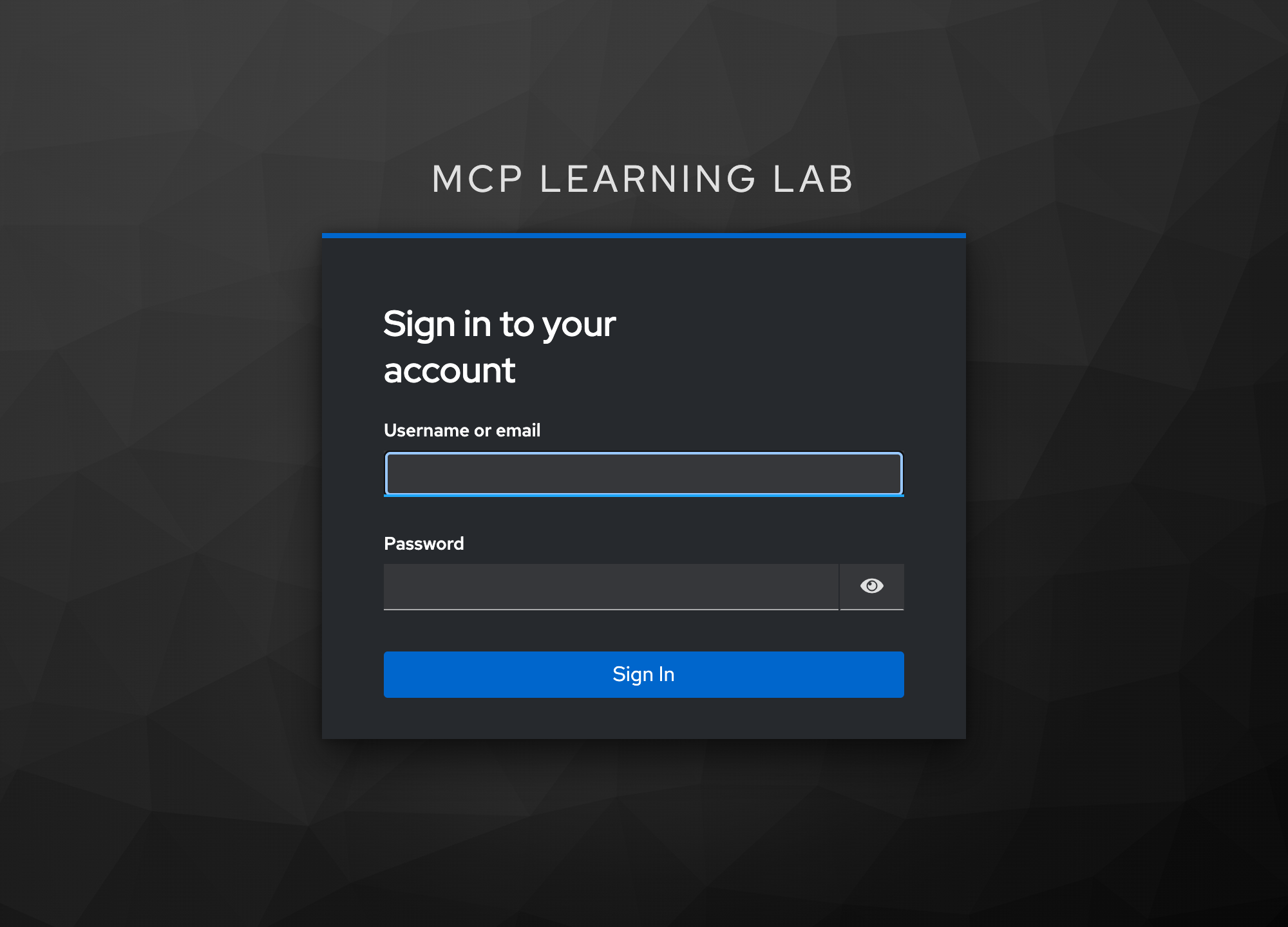
After the login comes the step Act 1 had no answer for at all — consent. Keycloak asks the user, in as many words, whether this app may act on their behalf, and itemises exactly what it’s asking for:
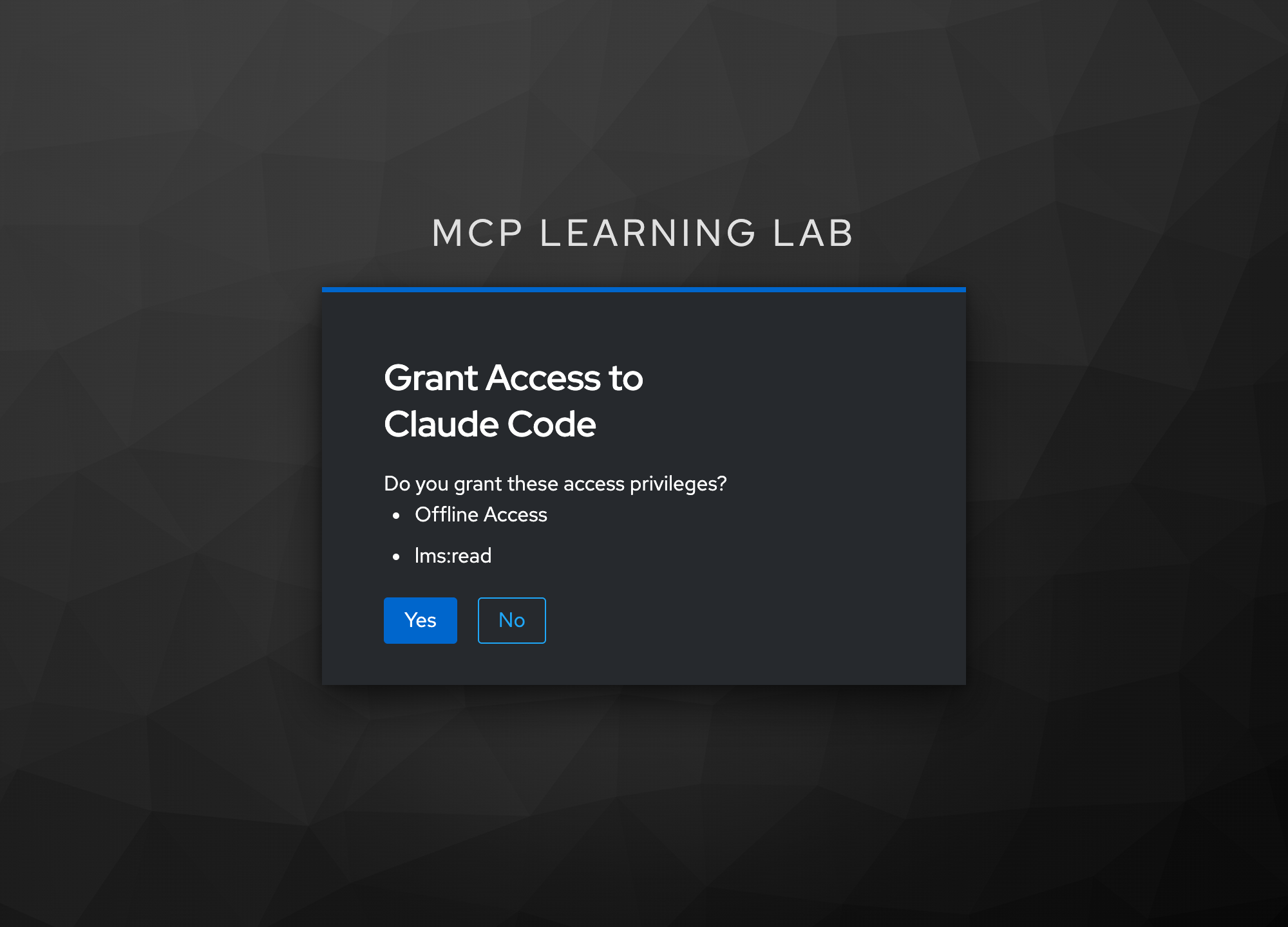
This screen exists because we deliberately kept Keycloak’s consent-required rule for self-registered clients. A client that signed itself up should never get silent access to someone’s account. That’s exactly what the MCP spec wants, so we left it switched on.
Step 5 — Swap the code for a stamped token
token_response = httpx.post(oidc["token_endpoint"], data={
    "grant_type": "authorization_code", "client_id": client_id,
    "code": code, "redirect_uri": REDIRECT_URI, "code_verifier": verifier,
})
access_token = token_response.json()["access_token"]
The browser redirect handed back a short-lived authorization code. The client trades it for the real access token, and this is where PKCE pays off: code_verifier is that original secret. Keycloak hashes it, checks it matches the fingerprint from step 4, and only then issues a token.
What comes back is a JWT whose claims look roughly like this:
{
  "iss": "http://localhost:8081/realms/mcp-lms",   // who issued it
  "aud": "http://127.0.0.1:8000/mcp",              // WHO IT'S FOR — our server, only
  "exp": 1770000000,                               // expires in an hour
  "scope": "openid lms:read offline_access",       // what it may do
  "preferred_username": "student1"                 // who the human is
}
Every one of those claims does a job. But aud — the audience — is the one that makes this design safe, and it gets its own section shortly.
Step 6 — The server checks the token, offline
The client retries its MCP call with the token attached, and our server has to decide whether to trust it. The whole verifier is about sixty lines: . Its heart is a single call:
return pyjwt.decode(
    token,
    signing_key.key,
    algorithms=["RS256"],
    audience=self._resource,   # reject tokens minted for other resources
    issuer=self._issuer,
    options={"require": ["exp", "iss", "aud"]},
)
Four checks in one call. Is the signature real, against Keycloak’s public keys? Did our realm issue it? Has it expired? And — the critical one — is aud our address? The require line matters more than it looks: it says those claims must be present, so a token that simply omits an audience can’t slip past a check that never runs.
Step 7 — The swap that ends the story
The token is valid. Now the server needs to actually talk to Moodle. Here is the most important design decision in the entire post, in :
if AUTH_MODE == "oauth":
    access = get_access_token()                     # already validated by the middleware
    username = (access.claims or {}).get("preferred_username", "").lower()
    moodle_token = pool.user_tokens.get(username)   # server-held, never sent to a client
    if not moodle_token:
        raise AuthError(...)
    return pool.for_token(moodle_token)
Read what that does. It takes the username out of the verified token — and then throws the token away. It looks up that user’s Moodle key in a table the server holds privately, and uses that to call Moodle.
The OAuth token never reaches Moodle. The client never sees a Moodle key. The two credential systems are joined only by a name, inside our process. That one choice is what the rest of this post is really about.
And turning all of it on takes about twenty lines — _auth_config() in :
return {
    "token_verifier": KeycloakTokenVerifier(issuer, resource),
    "auth": AuthSettings(
        issuer_url=AnyHttpUrl(issuer),
        resource_server_url=AnyHttpUrl(resource),
        required_scopes=["lms:read"],
    ),
}
Hand FastMCP a verifier and these settings, and the SDK does the remaining plumbing for free: it mounts the PRM document and sends the 401 with the signpost header. That’s far less code than most people expect — around a hundred lines for the whole feature. The specification is long; implementing it on a good SDK is not.
The confused deputy, and why passthrough is banned
The MCP specification flatly forbids token passthrough — taking the token a client sent you and forwarding it to the backend behind you. It’s worth understanding why, because the reasoning is the most interesting security idea in the protocol.
A confused deputy is a program that holds more authority than its callers and can be talked into using that authority on behalf of someone who shouldn’t have it. The program isn’t hacked. It’s obedient — it just can’t tell whose intent it’s serving. Our MCP server is exactly such a deputy: it holds Moodle keys for real users and takes instructions from clients over the network.
Here’s what passthrough would look like, and why it goes wrong:
That last sentence is testable. A valid token from our own realm, minted for a different service, must bounce. There’s a client in the realm that exists purely to play the villain:
def test_wrong_audience_token_rejected(oauth_server):
    """RFC 8707 resource binding: a VALID realm token minted for another
    service must not work here — this is the anti-confused-deputy property."""
    token = _jwt("student1", "Student1!pass", client_id="other-service-cli", scope="openid")
    r = httpx.post(URL, json={...}, headers={"authorization": f"Bearer {token}"})
    assert r.status_code == 401
Real user. Real password. Real signature from our own Keycloak. Not expired. And still a 401 — because aud names another service. That’s RFC 8707 resource binding, and it is the difference between “this token is genuine” and “this token is for me.”
Four things that broke, in the order they broke
Everything above reads as though it was designed and then typed. It wasn’t. Here is what actually happened, because the failures teach more than the finished code does.
1. Tokens that didn’t say who you were
The first working token came back — signature valid, audience correct — and the server still couldn’t tell who was calling. I decoded it and found no identity claims at all. No username, no subject, no email. Just an issuer, an audience, and a scope. Our whole design depends on reading a username out of that token, and the username wasn’t in there.
The cause was ordering during the realm import: Keycloak’s built-in profile and email scopes never got attached to our client, so the mappers that normally add those claims never ran. The fix is the same idea as the audience — put the username and email mappers on our own scope, so identity always travels with the token instead of depending on defaults happening to line up.
2. A policy that can never pass from Docker
Next, self-registration refused every attempt. Keycloak guards anonymous DCR with policies, and one of them is Trusted Hosts: the registering machine must be on an approved list. Sound in principle, unpassable here — Keycloak runs in a container, so every request from my laptop appears to arrive from Docker’s internal gateway address, never from a host it could be taught to trust.
The lab fix is a small script that removes that one policy and leaves the rest alone: . Crucially it keeps the consent-required policy — self-registered clients must still ask the user — which is precisely the behaviour MCP wants.
3. Why the OAuth test failed while the browser worked
This one is a great debugging story. Driving the login form from Python kept dying on a wonderfully unhelpful Keycloak error: “Restart login cookie not found.” The identical flow in a real browser worked perfectly.
The cause is a rule mismatch about cookies. Keycloak marks its login cookies Secure — meant only for encrypted connections — even when you’re on plain http://localhost. Browsers have a special exemption: localhost counts as a secure context, so they send the cookies anyway. Python’s standard cookie handling has no such exemption, and refuses on two separate grounds — a Secure cookie over plain HTTP, and an old cookie-versioning rule. So the cookies were silently dropped, and Keycloak rightly complained that the login it had started was gone.
The fix was to stop pretending and carry the cookies by hand — a tiny class in the test called _Browser that stores whatever Set-Cookie arrives and sends it back:
def _do(self, method: str, url: str, **kw) -> httpx.Response:
    headers = {"cookie": "; ".join(f"{k}={v}" for k, v in self._cookies.items())}
    r = self._client.request(method, url, headers=headers, **kw)
    for value in r.headers.get_list("set-cookie"):
        name, _, rest = value.partition("=")
        self._cookies[name.strip()] = rest.split(";", 1)[0]
return r4. The test passed. Every real client failed.
This is the one I’d tell in an interview. The headless test above went green, end to end. Then I clicked Authenticate in Claude Code — a real MCP client — and it failed three different ways in a row.
First failure: registration was rejected by a policy called “Allowed Client Scopes,” which only permits scopes on the realm’s default list. Our realm had replaced Keycloak’s built-in optional scopes instead of adding to them, dropping offline_access — the scope real clients request so they can refresh an expired token without making you log in again. Fixed by restoring the built-ins and removing that policy in the lab script too.
Second failure, and the real root cause: the login step died with invalid_scope. Here’s the chain. Keycloak grants a self-registered client only the scopes it asked for at registration time. A generic MCP client can only know the scopes we advertise in our PRM document. But our audience and username mappers were sitting on a separate scope called mcp-resource — one the client had no way to know about, and therefore never requested. So its token came out with no audience and no username. Our server rejected it, correctly, for reasons that looked baffling from the client’s side.
And why had the test passed? Because it registered with no scope field at all, silently receiving the realm defaults. It had been constructing the ideal request — one no real client would ever send.
Third failure: Offline tokens not allowed for the user or client. Our partial realm import had created users with no role mappings at all, so they lacked the built-in role that permits refresh tokens. One line per user in the realm JSON — "realmRoles": ["default-roles-mcp-lms"] — fixed it.
The deepest one: advertise ≠ require
Even after all that, Claude Code still failed at the login step with invalid_scope on lms:read offline_access. This last one deserves its own section, because it’s a genuinely good idea hiding behind a confusing bug.
Follow the chain:
- Claude Code wants a refresh token, so it adds
offline_accessto its login request. - But Keycloak grants a self-registered client only the scopes it requested at registration.
- The client derives that list from our PRM document, which advertised only
lms:read. - So the client never had
offline_access— and asking for it is an error.
A scope we don’t advertise can never be obtained. The obvious fix is to advertise it. And here’s the catch: the SDK ties the advertised scope list to the list the server requires on every token. Adding offline_access there would mean rejecting any token that lacks it — including tokens from our own password-grant test client. Fixing one client would break another.
The insight is that these are two different sets, and the SDK’s convenience had quietly conflated them:
| Set | Meaning | Ours |
|---|---|---|
| Advertised | Scopes a client may ask for. A menu. | lms:read, lms:write, offline_access |
| Required | Scopes every token must carry, or be refused. | lms:read |
So we keep requiring only lms:read, and replace the metadata route to advertise the wider menu — _advertise_extra_scopes in :
metadata = {
    "resource": resource,
    "authorization_servers": [issuer],
    "scopes_supported": ["lms:read", "lms:write", "offline_access"],  # the MENU
    "bearer_methods_supported": ["header"],
}And with that, a real client connects. This is Claude Code’s own MCP panel, not a mockup:
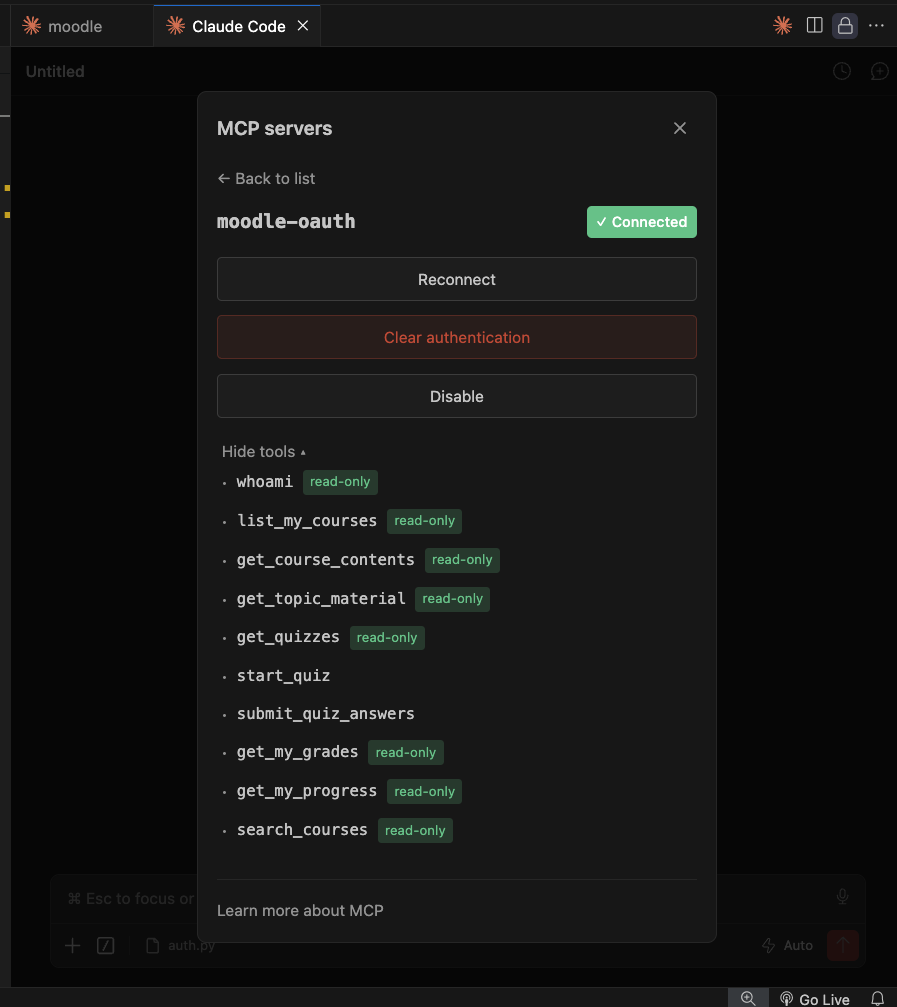
That last point deserves saying plainly. Authentication and authorization stayed separate. Keycloak proves who you are. Moodle’s capabilities still decide what you may do. The role-gating from the last post kept working, untouched, under an entirely new auth system — which is exactly what good layering buys you.
The recap, interview-style
This phase answers most of the auth questions an interviewer can ask about MCP. In short form:
- “Walk me through what happens when a client connects to a protected MCP server.” 401 with a metadata pointer → fetch PRM → discover the IdP → register dynamically → authorization code + PKCE with a real login and consent → an audience-bound JWT → retry the call.
- “Why is token passthrough forbidden?” Confused deputy. Forward a caller’s credential and the backend can’t tell whose intent it’s serving; audiences get laundered, and a token stolen from another service can be replayed. Verify, then swap for a credential you hold yourself.
- “How do you bind a token to one resource server?” RFC 8707: the IdP stamps an
audclaim (in Keycloak, an audience mapper), and the server rejects anything whoseaudisn’t its own address. We have a test for the negative case. - “Access token vs the backend’s own credentials — who holds what?” The client holds a short-lived, scoped, audience-bound badge. The server holds the backend keys privately and never hands them out. The two meet only as a username lookup inside the server.
- “Why validate via JWKS offline instead of introspection?” Speed and availability versus instant revocation. Offline means no network call per request and no hard dependency on the IdP being up, at the cost of a stolen token staying valid until it expires; short lifetimes are the mitigation. Say the trade-off out loud — that’s what’s being tested.
Your turn: three questions
MCP Auth — quick check
0/3 answered// question
Why does the MCP spec forbid forwarding the client’s token to the backend system behind your server?
// question
A token is correctly signed by your realm, not expired, and belongs to a real user — but your server returns 401. What’s the most likely reason?
// question
Your server requires the scope lms:read. A real client needs offline_access for refresh tokens and fails with invalid_scope. What’s the right fix?
What’s next
Auth is done properly now: real logins, real consent, expiring tokens bound to this one server, and a backend credential that never leaves the process. But being authenticated is not the same as being safe. An MCP server takes instructions from a language model, and that opens a category of problem that has nothing to do with tokens — tool descriptions written to manipulate the model, instructions smuggled in through the data your tools return, and tools quietly holding more power than they need.
That’s the next post: Securing an MCP Server — tool poisoning, prompt injection, and least privilege, plus the sampling-powered tools we’ve been deferring since the very first post.