MCP · Full build · 05 of 5
The Frontend
Three posts in, TaskFlow is a database, an API, and a set of rules — and nobody has clicked anything. This post is the React app. It exists for two reasons that have nothing to do with React: to prove the backend is a real product and not a fixture for an MCP server, and to give you something familiar to compare the chat client against later. It gets one post and does not get to consume more than that.
Five screens
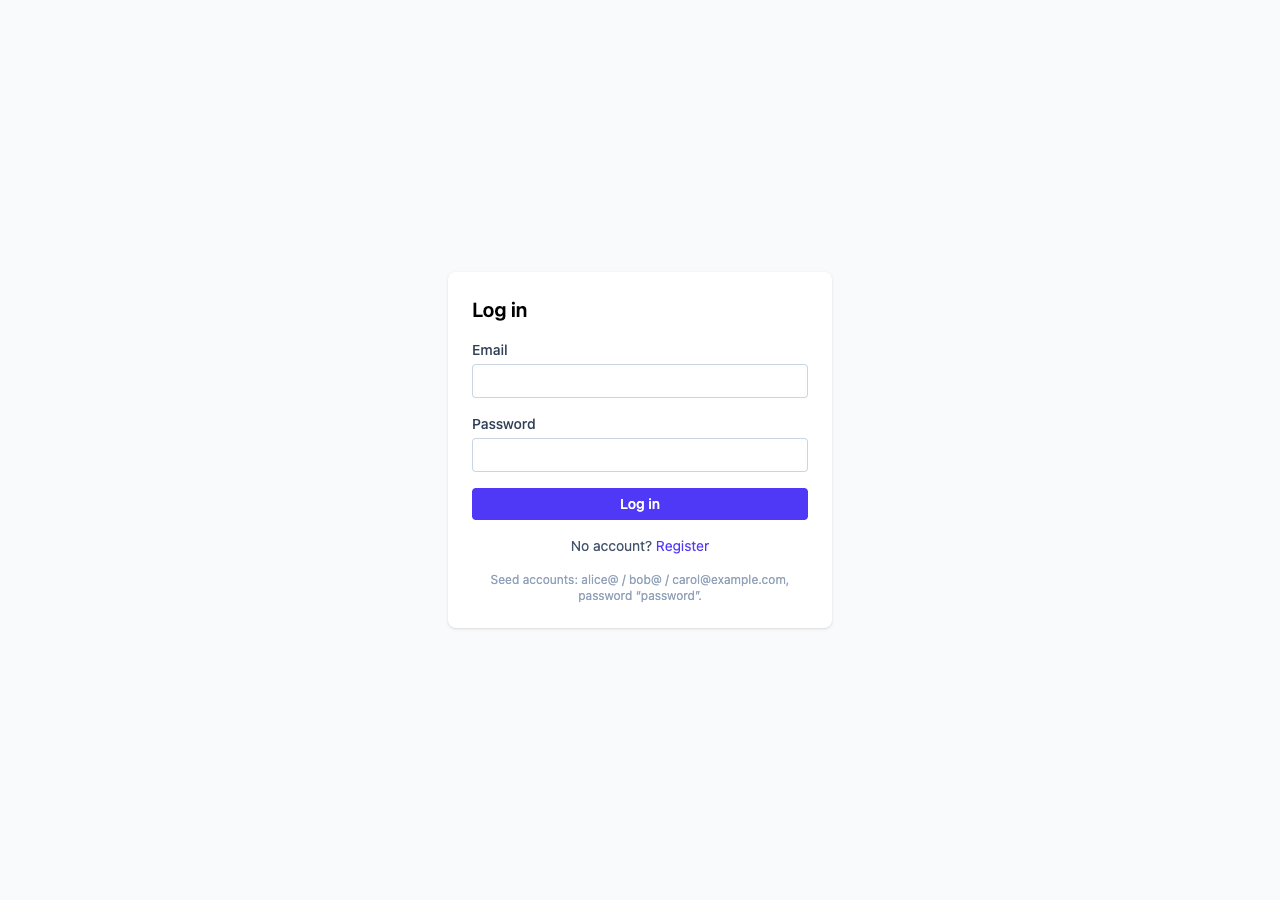
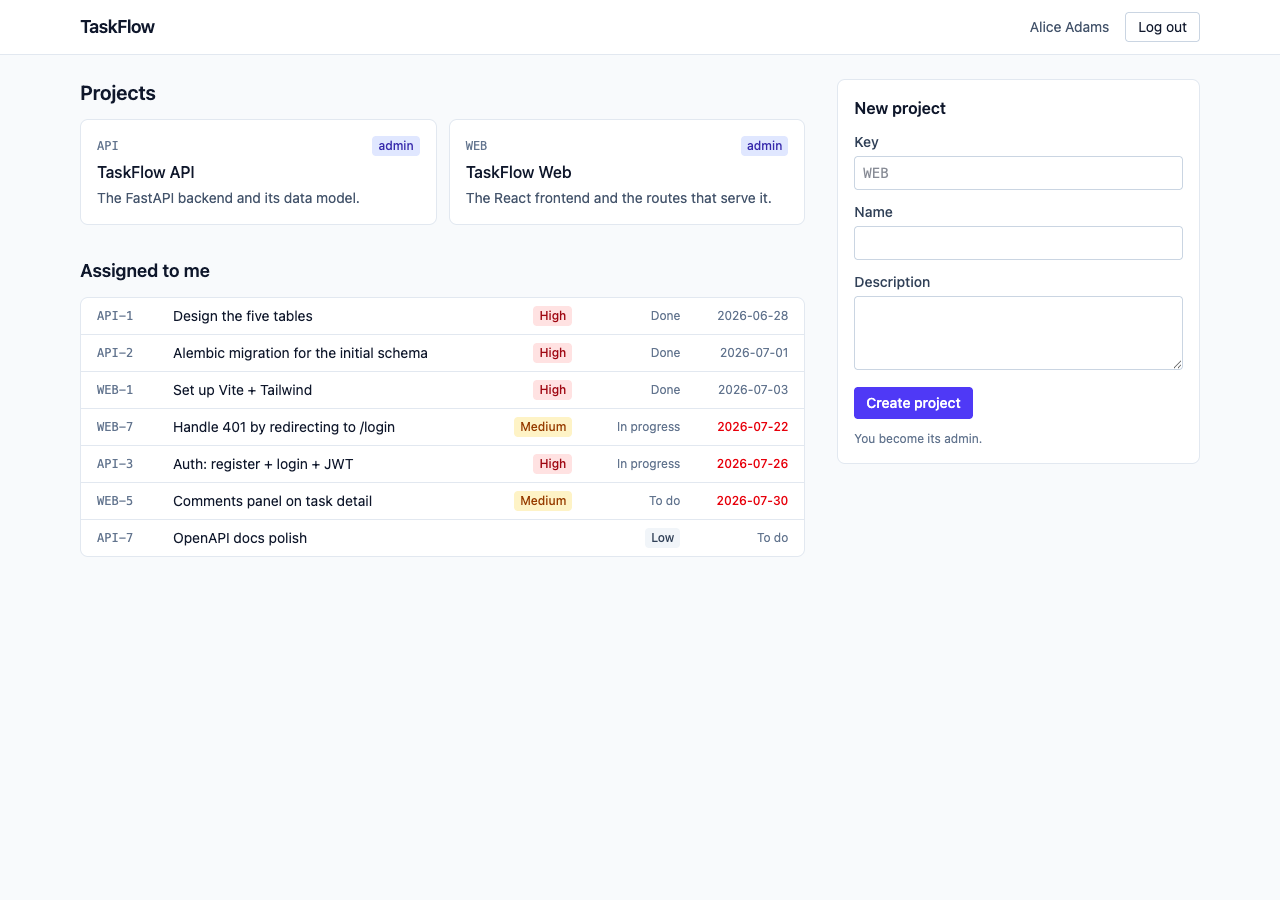
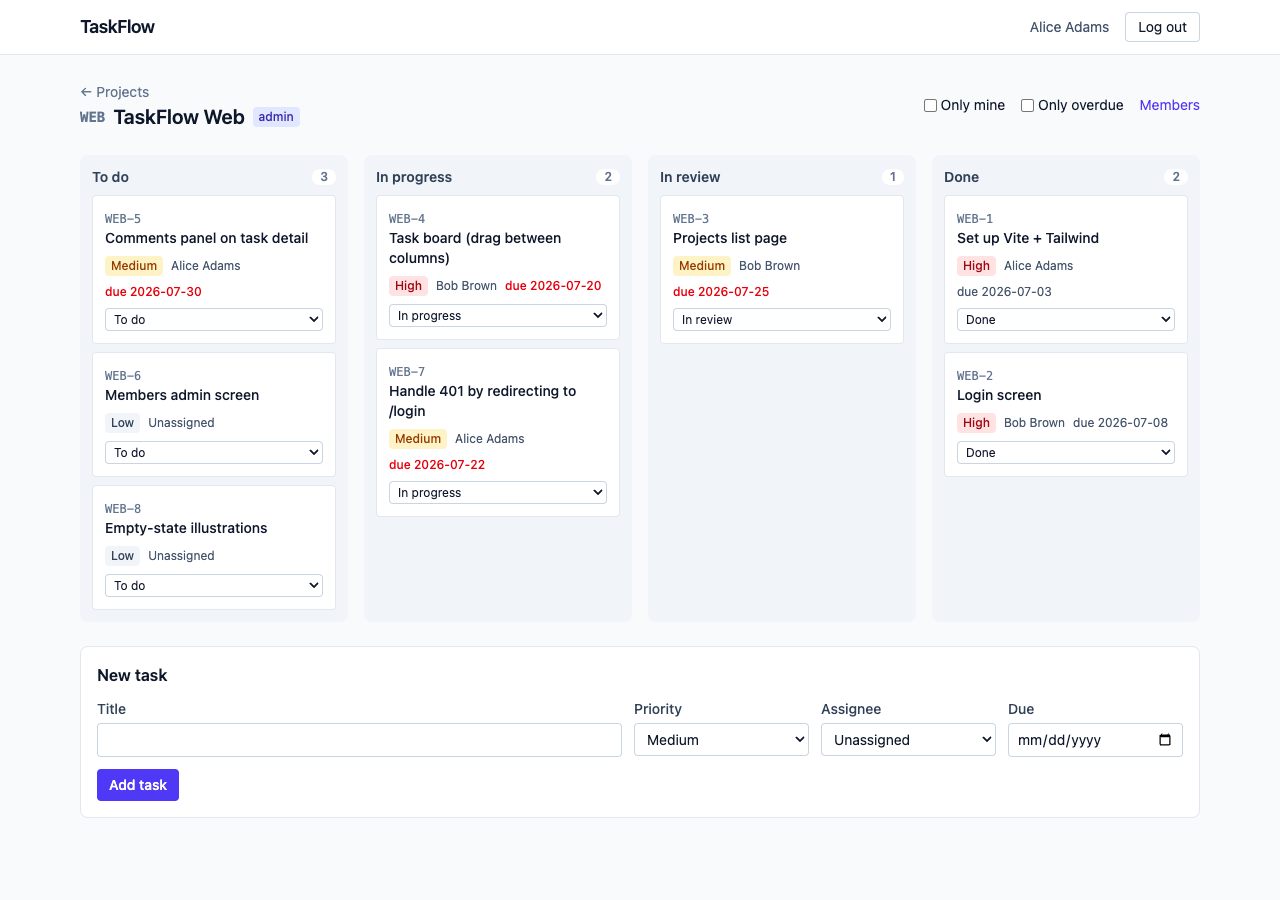
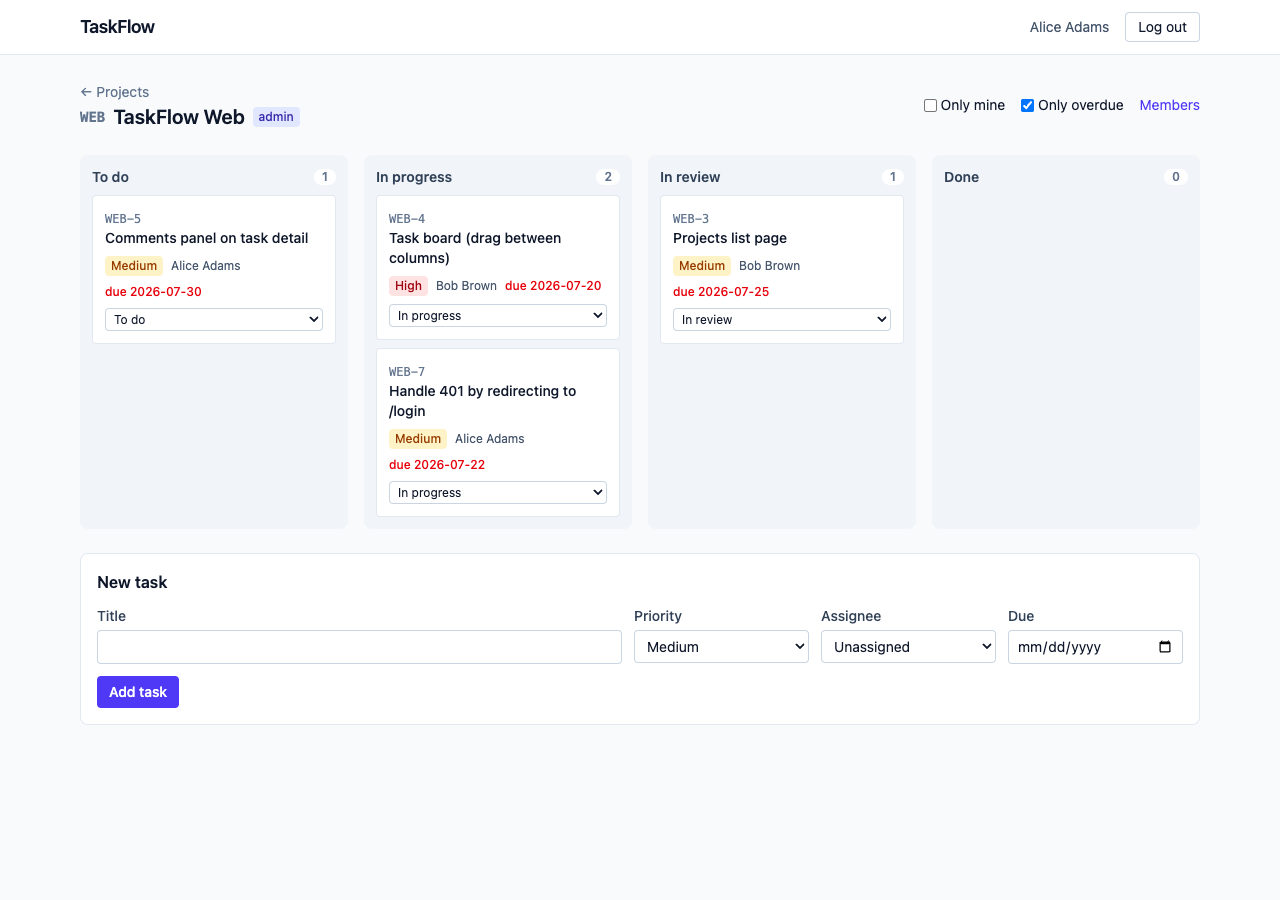
The design doc lists five, and the app has five. Every one of them is one file in src/pages/, and every one calls the API through the same typed functions. Here is the flow a person walks, with Alice — admin of both seeded projects — driving.
One fetch
Every request the app makes goes through one function in . The pages call typed wrappers — one per route in the design doc — and never touch fetch. That is what keeps “how we talk to the API” in one place when it inevitably changes.
async function request<T>(method: Method, path: string, body?: unknown): Promise<T> {
  const headers: Record<string, string> = {};
  if (body !== undefined) headers["Content-Type"] = "application/json";
  if (token !== null) headers["Authorization"] = `Bearer ${token}`;

  const response = await fetch(API_URL + path, {
    method,
    headers,
    body: body === undefined ? undefined : JSON.stringify(body),
  });

  // DELETE routes answer 204 with no body; `response.json()` would throw.
  if (response.status === 204) return undefined as T;

  const data: unknown = await response.json().catch(() => null);

  if (!response.ok) {
    // Only a 401 on a request that *had* a token means "your session is
    // over". A 401 from POST /auth/login with a wrong password is a
    // different thing — it's the answer to the question, not a sign that
    // anything expired — and must not bounce the user around.
    if (response.status === 401 && token !== null) {
      setToken(null);
      unauthorizedHandler();
    }
    throw new ApiError(response.status, errorMessage(response.status, data));
  }
  return data as T;
}- The token rides along on every call.
Authorization: Bearer …, exactly the header last post’scurrent_userreads. It is held in a module-level variable and mirrored tolocalStorageso a reload doesn’t log you out. Anyone who can run JavaScript on the origin can read it — that is the standard objection, and the file says so in a comment rather than hiding it. The alternative, an httpOnly cookie, needs CSRF protection and a different CORS setup, which is a post of its own. - A 401 is two different things. From
/auth/loginit means “wrong password”. From anything else it means “your token is dead”. The first draft bounced the user to the login page on both — which, on the login page, meant the error flashed and vanished. One condition fixes it: only a 401 on a request that carried a token ends the session. - Two error shapes become one sentence. FastAPI answers 401/403/404/409 with
{"detail": "a sentence"}and 422 with a list of what was wrong.errorMessageflattens either into something a banner can show. Because the backend wrote its sentences to be read by a person, the frontend never composes an error message of its own. - The types are snake_case on purpose. mirrors the Pydantic schemas field for field and keeps
full_nameandmy_role. The repo convention is camelCase for TypeScript identifiers, but these describe JSON we don’t own. A rename layer between the reader and what they see in the network tab is exactly where “works in curl, not in the app” bugs live.
PATCH sends the diff
Last post spent a section on the backend telling apart “left out” from “sent null”. The task form in is where that distinction earns its keep:
/** The PATCH body: only what changed. Empty strings become null. */
function diff(task: Task, draft: Draft): TaskPatch {
  const patch: TaskPatch = {};
  if (draft.title !== task.title) patch.title = draft.title;
  if ((draft.description || null) !== task.description) patch.description = draft.description || null;
  if (draft.status !== task.status) patch.status = draft.status;
  if (draft.priority !== task.priority) patch.priority = draft.priority;
  if ((draft.assignee_id || null) !== (task.assignee?.id ?? null)) {
    patch.assignee_id = draft.assignee_id || null;
  }
  if ((draft.due_date || null) !== task.due_date) patch.due_date = draft.due_date || null;
  return patch;
}- Form fields are strings; the API wants
nullfor “none”. An empty assignee select is"".draft.assignee_id || nullturns it intonull, which the backend reads as “unassign”. A field the user didn’t touch is never added topatchat all. JSON.stringifyalready speaks PATCH. A key whose value isundefinedvanishes from the output; a key whose value isnullsurvives. So aTaskPatchwith optional-and-nullable fields maps onto the wire with no code at all. Sending the whole form would also have worked — and would have hidden the one thing the backend’s PATCH was designed around.- The same function drives the Save button.
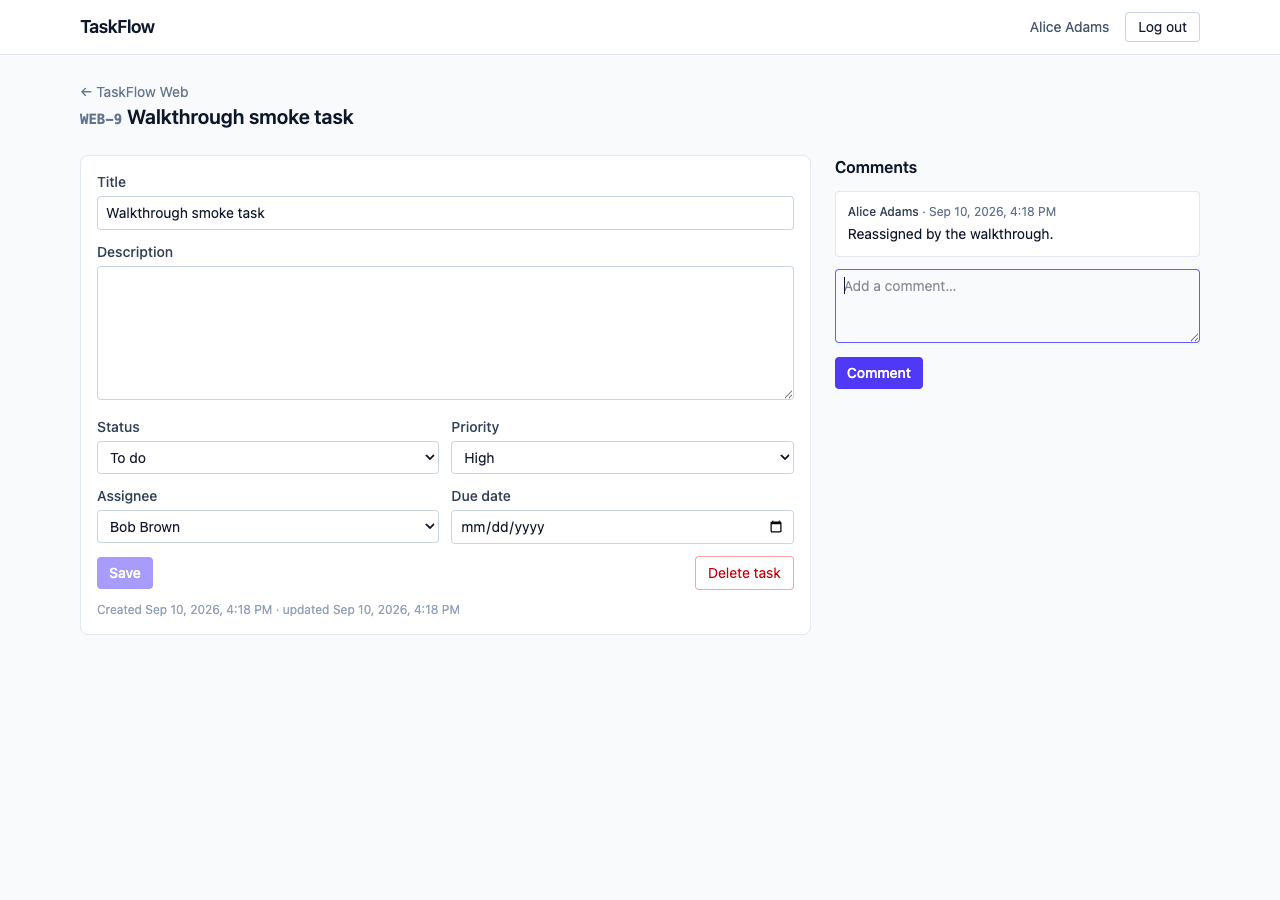
dirtyis “doesdiff()return anything?”, recomputed on every render. Nothing changed, nothing to send, Save disabled — that is the greyed-out button in the screenshot above.
// question
On WEB-9, Alice clears the assignee select (to “Unassigned”) and changes nothing else, then clicks Save. What body does the browser send?
Thirty lines instead of a library
Four pages need the same thing: fetch on mount, show the error, refetch after a write. That is one hook, , and it is the “no React Query” decision in code. The part worth reading is the flag:
useEffect(() => {
  // Why the flag: React 19 in dev (StrictMode) mounts, unmounts and mounts
  // every component once to surface effects that don't clean up. Without
  // this, the first (thrown-away) mount's response could land after the
  // second's and overwrite fresh data with stale. The same race happens
  // for real when the user clicks from WEB to API before WEB has loaded.
  let cancelled = false;
  setState((previous) => ({ ...previous, loading: true, error: null }));
  load().then(
    (data) => {
      if (!cancelled) setState({ data, error: null, loading: false });
    },
    (error: unknown) => {
      if (!cancelled) setState({ data: undefined, error: describeError(error), loading: false });
    },
  );
  return () => {
    cancelled = true;
  };
}, [...deps, generation]);
StrictMode forces you to write this, and then it turns out to be the same guard you need when a user navigates faster than the network answers. generation is a counter; bumping it is how reload() re-runs the effect after a save. React Router — the one dependency beyond React — is used in plain <BrowserRouter> mode with no loaders, so it stays a route table.
Hide, don’t enforce
Admin controls — the Members link, the Delete task button, the add/remove member form — are shown only to admins. Nothing in the frontend prevents anything. From :
// The list is visible to any member (GET .../members is member-only in the
// backend); adding and removing are admin-only. The form and the remove
// buttons are shown only to admins. That is a courtesy for the reader of
// the page, not the rule — the rule is `require_admin` in app/deps.py, and
// phase 8's tool gating will follow exactly this shape: hide, but never rely
// on hiding.

const isAdmin = project.data?.my_role === "admin";
// ...
{isAdmin && (
  <button type="button" onClick={() => removeMember(m)}>Remove</button>
)}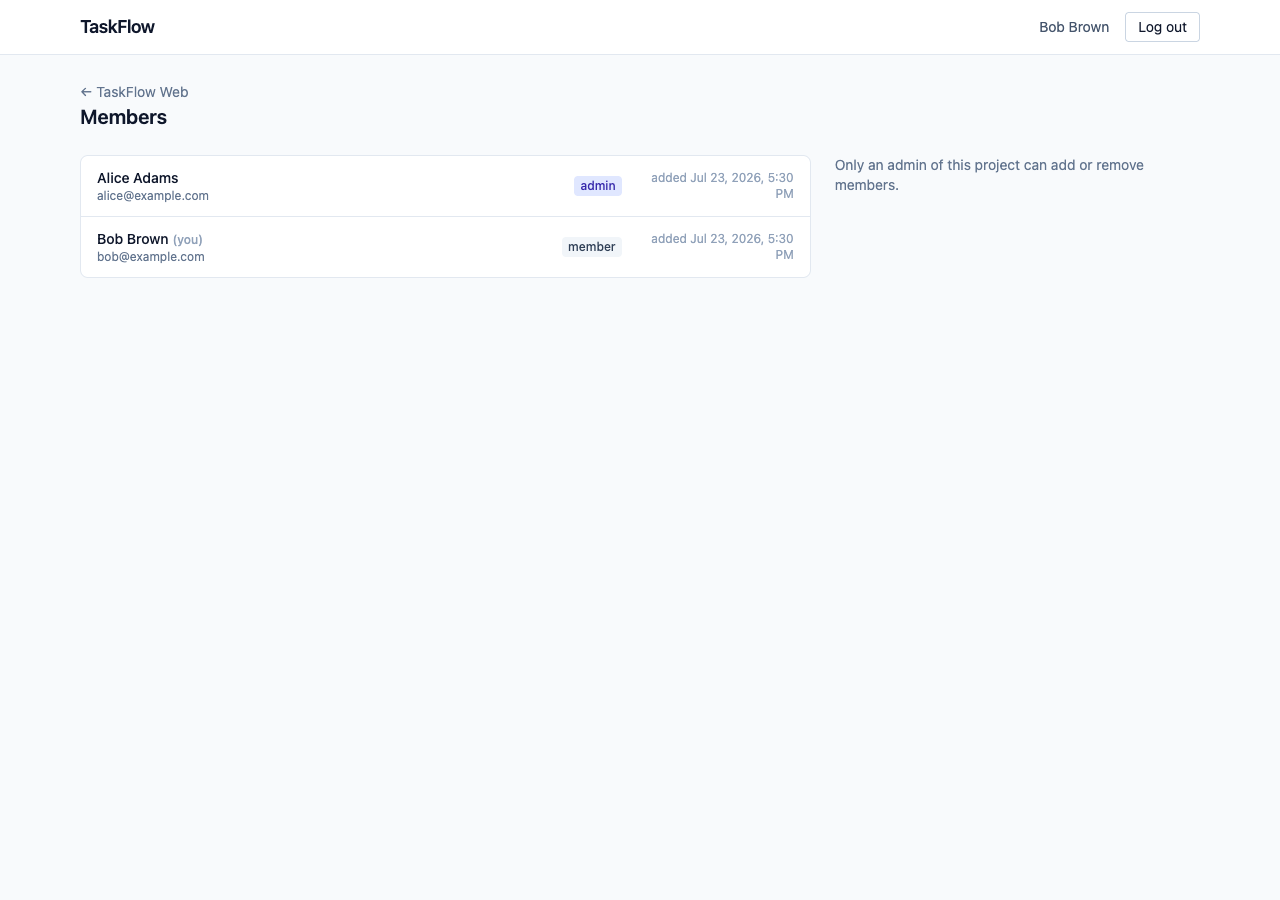
isAdmin comes from my_role on the project response — the caller’s row in project_members, read fresh on every load. Promote Bob and his next page load shows the form. The route guard in App.tsx says the same thing about itself in a comment: anyone can delete this component and see the pages — but every page would then get 401s from the backend and show nothing. The backend is the rule; the guard is the good manners. Keep that sentence. It is the shape of the MCP tool gating, four posts from now.
One .env, and a prefix that does the security
Every service in TaskFlow reads the same .env at the repo root. Vite would normally look for one next to , so two lines point it up a level:
const repoRoot = fileURLToPath(new URL("..", import.meta.url));

export default defineConfig(({ mode }) => {
  // "" as the prefix filter: give me every variable, because FRONTEND_PORT
  // does not start with VITE_. This is config-side, not browser-side.
  const env = loadEnv(mode, repoRoot, "");

  return {
    plugins: [react(), tailwindcss()],
    // Where the *browser* bundle gets its variables from. Vite only exposes
    // variables prefixed VITE_ to browser code, so the database password in
    // the same file can never leak into the bundle. That prefix is the whole
    // safety mechanism; keep it in mind before naming anything VITE_.
    envDir: repoRoot,
    server: {
      port: Number(env.FRONTEND_PORT ?? 5173),
      // If 5173 is taken, fail instead of silently picking 5174 — the
      // backend's CORS list names 5173 exactly.
      strictPort: true,
    },
  };
});
The same file holds POSTGRES_PASSWORD and JWT_SECRET. The only thing keeping them out of a JavaScript bundle anyone can download is that their names don’t start with VITE_. Worth knowing before you name anything.
The “done when” is a script
The design doc’s bar for this phase is can do the whole flow with a mouse. The repo’s rule is no manual clicking that isn’t also a script. So drives a real headless Chrome through every screen, against the running backend and the seed, and checks what a person would check. Nineteen checks; every screenshot in this post came out of it.
  ok  wrong password: 401 sentence shown, still on /login
  ok  projects: WEB listed
  ok  projects: API listed
  ok  board: WEB-4 moved in_progress → in_review via PATCH
  ok  board: "Only overdue" filter asked the API (4 of 8 shown)
  ok  board: task created (201) and appears in To do
  ok  task WEB-9: Save disabled while nothing changed
  ok  task WEB-9: assignee + priority saved, form refilled from the response
  ok  task WEB-9: comment posted and listed
  ok  task WEB-9: deleted (204), back on the board without it
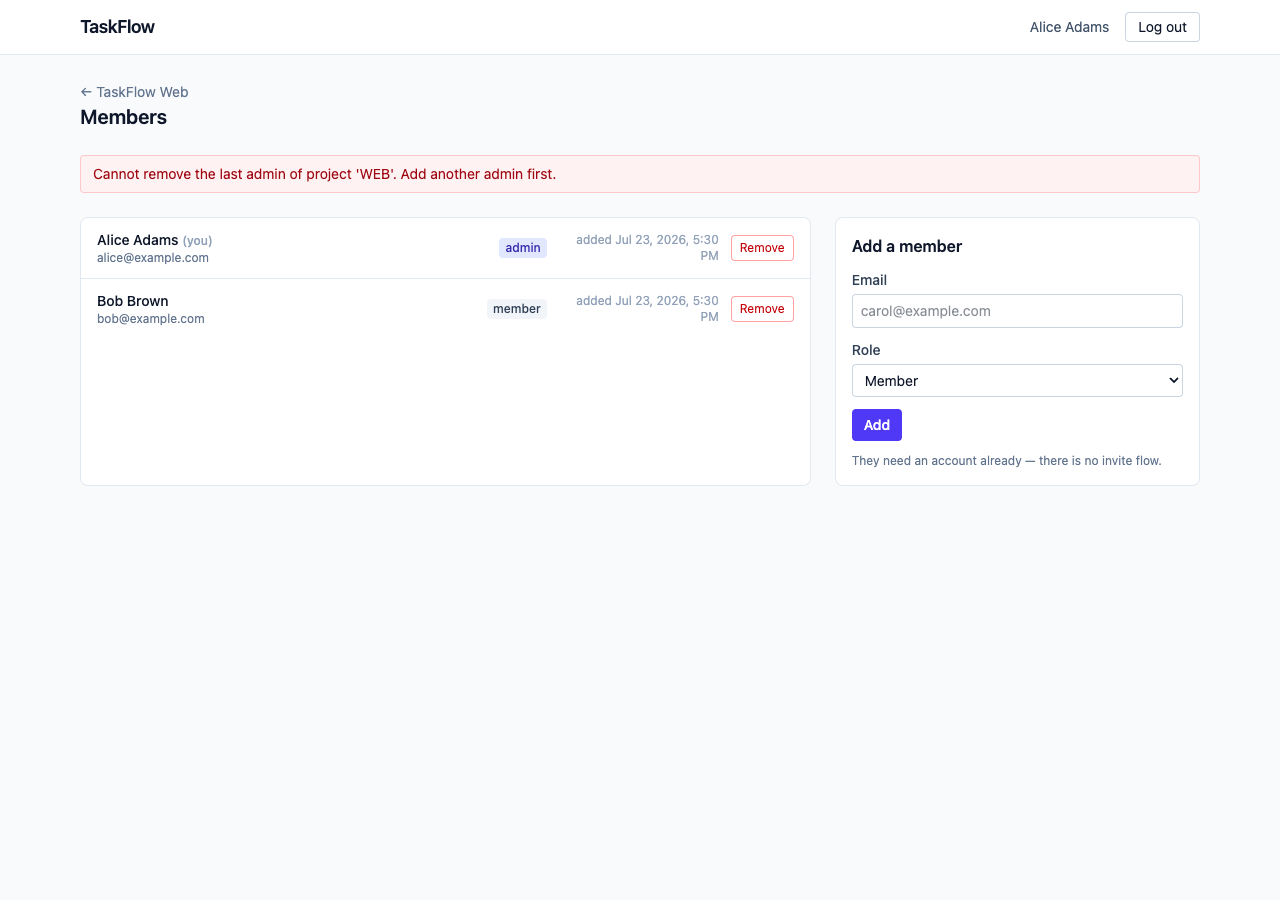
  ok  members: removing the last admin shows the 409 sentence
  ok  members: Carol added (201)
  ok  members: Carol removed (204)
  ok  logout: token gone from localStorage
  ok  bob: no Members link on the board
  ok  bob: members page by URL is read-only, no form
  ok  bob: project he's not in shows the backend's 403 sentence
  ok  bad token: 401 on /auth/me → login page, token cleared
  ok  no console errors

PASS — screenshots in ../scratch/screenshots/- Zero dependencies. Node 22+ ships
fetchand aWebSocketclient, and Chrome speaks the DevTools Protocol over a WebSocket. Everything in the script is “send a JSON command, wait for the reply”. Playwright would have hidden exactly the part worth seeing. - It leaves the database as it found it. Creates then deletes; adds then removes; moves a card then moves it back. You can run it twice.
- It is not in
npm run build, and it is not pytest. It needs Chrome and two running servers. The rules are tested where they live, infastapi-backend/tests; this proves the UI wires the routes together. Honest, and enough for one post.
What went wrong
Vite built a bundle with a type error in it
$ npx tsc --noEmit
error TS2345: Argument of type 'TaskFilters' is not assignable to parameter of type
  'Record<string, string | boolean | undefined>'. Index signature for type 'string' is missing.

$ npx vite build      # same tree
✓ built in 310ms
Two things. Vite transpiles with esbuild, which strips type annotations and never checks them, so a successful vite build says nothing about types. And the error itself: TypeScript infers an implicit index signature for object type aliases but refuses to for interfaces, because an interface can be extended later with a property of any type. TaskFilters was an interface. It became a type, with a comment, and "build" is now tsc --noEmit && vite build so this class of bug can’t ship. The Vite docs mention the no-type-checking on the TypeScript features page — not next to vite build. The interface-versus-type rule is in a 2017 GitHub issue, not the handbook.
The walkthrough’s first draft used nth-of-type on selects
timed out waiting for selector form select:nth-of-type(3), while the page visibly had four selects. :nth-of-type counts siblings within one parent, and each select sits inside its own <label>, so every select is the first of its type. A script bug, not an app bug, and it cost a run. The fix indexes into document.querySelectorAll("form select") and gives the board’s selects an aria-label so a test can name them — which also makes them readable to a screen reader, the right reason to have it. MDN does say this about :nth-of-type. We didn’t read it.
Said plainly: what this frontend does not do
- No tests in the pytest sense. The walkthrough is the proof, and it won’t run in CI as-is.
- The token is in
localStorage. See the comment inapi.ts. - No pagination, no search, no drag-and-drop. Four columns and a select. No role change — promote by removing and re-adding as admin.
window.confirmfor destructive actions; a modal would teach nothing. - The seed’s dates are fixed, so “overdue” drifts. Every due date is in July 2026, so by the time you run this, every dated task is red. Cosmetic.
Run it
The backend from last post must be up on :8000 with the seed loaded. Then, from the Phase 4 commit:
git clone https://github.com/Jayantkhandebharad/mcp-taskflow.git
cd mcp-taskflow
git checkout 4ce4dff

# terminal 1 — the database and the API, exactly as last post
cp .env.example .env
docker compose up -d db
cd fastapi-backend && uv sync && uv run alembic upgrade head && uv run python -m scripts.seed
uv run uvicorn app.main:app --reload --port 8000

# terminal 2 — the frontend
cd frontend
npm install                 # from package-lock.json
npm run dev                 # http://localhost:5173

# optional, terminal 3 — the scripted click-through (needs Chrome)
cd frontend && npm run walkthrough
Log in as alice@example.com / password. Then log out and in again as bob@example.com, and notice what is missing from his board. Then type /projects/API into the address bar as Bob and read the banner. That banner is last post, seen from the other side.
What’s next
The app is finished. Database, rules, API, a face — and not one line of it knows what MCP is. Which means the part this series exists for can finally start: next post is your first MCP server. It will log in the same way this frontend does, hold the same kind of token, and call the same /auth/me and /projects you just watched the browser call — and Claude Desktop will use it. The frontend and the MCP server are the same kind of client. If that sentence already feels obvious, this post did its job.
- One
fetch. The token goes on every call; a 401 only ends the session if the call carried one. - PATCH the diff.
""becomesnull, untouched becomes absent, andJSON.stringifydoes the rest. - Hide, but never rely on hiding.
my_roledecides what’s shown;require_admindecides what’s allowed. - Only
VITE_*reaches the browser. That prefix is the whole wall between your secrets and your bundle. vite builddoes not type-check. Puttsc --noEmitin front of it.- The done-when is a script. Chrome’s DevTools Protocol is JSON over a WebSocket; you don’t need a framework to click.